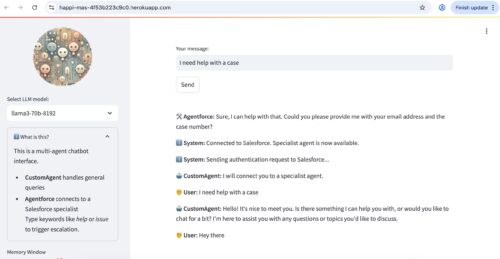
In this post, I have shared the creation of an autonomous Multi-Agent System (MAS) – that integrates a general-purpose AI assistant (developed using Python/Streamlit) with a specialist agent (Salesforce Agentforce).
Following is the interaction flow.
User sends a message, like a question or request.
The message first goes to CustomAgent (a general-purpose AI).
CustomAgent decides:
– If the question is simple, it answers directly.
– If the question seems complex or technical (like about a service issue), it asks:
“Should I connect you to Agentforce?”If the user agrees, the system connects them to Agentforce (a specialist AI connected to Salesforce).
Agentforce gives help for detailed or account-specific problems.
Designed to escalate queries intelligently, this multi-agent system (MAS) system can guide users through general questions and smoothly transfer them to a domain expert (Salesforce Agentforce) when needed.
Internal Workflow and Logic of the Multi-Agent AI System
Sidebar and User Interface Setup
This section lets users control what kind of AI they want and how much it remembers. The sidebar is used to show a logo and let the user choose which language model to use. It also contains sliders and help text. This keeps the main screen clean and interactive.
with st.sidebar:
st.markdown(…) # shows our Multi-Agent System (MAS) icon/logo
selected_model = st.selectbox(…) # lets user choose the AI model
memory_window = st.slider(…) # lets user decide how much context the AI remembers
Memory & Conversation Handling
Think of this like a short-term memory for the custom agent. You decide how much it should remember.
The custom agent uses something called ConversationBufferWindowMemory, which just means the agent remembers a limited number of recent messages to sound more natural.
ConversationBufferWindowMemory(
k=memory_window, memory_key=”chat_history”, return_messages=True
)
General Agent (CustomAgent)
We’re giving the agent a character — polite, helpful, and aware of the conversation so far. This agent responds to regular questions using the LLM model. Here’s how we define its personality and behavior:
prompt = ChatPromptTemplate.from_messages([
SystemMessage(content=”You are CustomAgent, a helpful chatbot…”),
MessagesPlaceholder(variable_name=”chat_history”),
HumanMessagePromptTemplate.from_template(“{human_input}”),
])
Smart Escalation Logic
The custom agent senses when a question is beyond its range, and suggests bringing in an expert — but waits for the user’s confirmation. If the user types words like “case” or “support,” the chatbot offers to connect to a specialist:
if any(keyword in user_input.lower() for keyword in ESCALATION_KEYWORDS):
st.session_state.chat_history.append({“sender”: “CustomAgent”, “message”: “I will connect you to a specialist.”})
st.session_state.mode = “agentforce”
st.session_state[“pending_confirmation”] = True
st.session_state[“escalated_input”] = user_input
In my current project I am using a deterministic escalation logic based on keywords. However, in future projects I plan to build in an AI based escalation logic. In such a scenario, the multi-agent AI system will use a smart, flexible method for transferring conversations between a general-purpose custom agent and a specialist agent (Agentforce).
I am thinking that instead of relying on static keyword rules, we could use a large language model (LLM) to analyze user messages and calculate a probability score indicating whether expert help is needed. If the score crosses a threshold, the custom agent will offer to transfer the user to Agentforce.
This decision process would be dynamic, context-aware, and evolve over time by learning from past interactions—ensuring smarter, more human-like handoffs.
User Confirmation Before Escalation
The app doesn’t switch right away — it waits for the user to click “OK.” After the offer to escalate, the user sees a button:
if st.session_state.get(“pending_confirmation”):
if st.button(“OK to proceed”):
st.session_state[“escalation_triggered”] = True
st.session_state.pop(“pending_confirmation”, None)
st.rerun()
Specialist Agent (Salesforce Agentforce) Connection
This part acts like calling in a real agent from Salesforce to continue the conversation. To ensure a warm hand-off I have included the logic to send the original user question to the expert bot (Salesforce Agentforce).
If the user agrees, the app connects to a Salesforce-based specialist AI agent. It requests an access token and session ID.
The connected app framework in Salesforce is leveraged for making this API call to Salesforce Agentforce. Please refer to Salesforce Agent API Developer Guide for more details.
access_token = get_access_token()
session_id = create_session(access_token)
response = send_message_agentforce(session_id, access_token, user_msg)
Conversation History & Display
All messages are shown in reverse order (newest on top), each with a little emoji to show who’s speaking:
if sender == “CustomAgent”:
icon = “🤖”
elif sender == “Agentforce”:
icon = “🚰”
elif sender == “User”:
icon = “🤵”
else:
icon = “ℹ️”
Final Thoughts
Even when developing a custom autonomous AI agent for corporate needs, Salesforce Agentforce — accessed through the Salesforce Agent API — remains a powerful option for use cases related to customer engagement applications (e.g., sales, service, marketing, analytics).
Salesforce Agentforce makes building smart customer service solutions faster and easier. Since Agentforce natively integrates with the Salesforce application, it is ‘aware’ of both data and metadata in the Salesforce instance. As such Salesforce Agentforce can not only provide information to the user (e.g., details of support cases), but also take action such as update a service case with comments, or autonomously follow up with sales/marketing leads.
What I have shared in this post is a very simplistic working example of a multi-agent system leveraging the Salesforce Agentforce API – however a real world multi-agent system requires many additional considerations (e.g., security, testing, devops).
Specifically regarding Salesforce Agentforce implementations, please refer to the Salesforce documentation including the user authentication related topics such as “To verify the identity of an unverified user in an agent session, configure your agent to use the Customer Verification topic and limit access to topics and actions that you specify.“
Please see my previous post “Building an LLM Powered Autonomous AI Agent from Scratch — and Deploying It on Heroku” for additional details about developing a custom AI agent with Python and the steps for deploying it on Heroku.
Caution
This is a simple demo project for my personal testing. It does not have any relationship to any real-world apps and should not be taken as a template for any production implementation.
1,030 total views, 2 today